Eyes on the “Street”: You Can Upload Cash Purse Directly to Your TAP Card

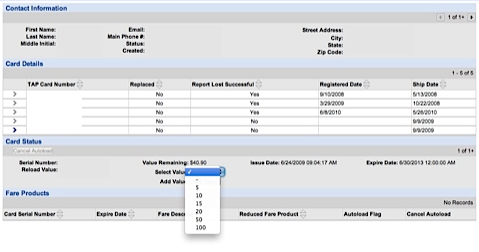
Last night, a reader who wished to remain anonymous passed along the good news that users of Metro’s “TAP Card” can now add cash amounts, not just multi-trip passes such as monthly passes, to their card via TAP’s official website. We should note that the new balance doesn’t load immediately, but will the next time you tap your TAP card.
I checked in on the TAP site tonight and was surprised to find changes there. Some of the extraneous non-functioning sections of the site have been removed and it was cleaned up a bit with even some of the former icon buttons removed and replaced with just text links.
But the big news is when you go the fare products page, it has a button for adding Stored Value. When you click on the button, it shows you the Balance of the card which is selected. You can add cash in denominations of $5, $10, $15, $20 $50 and $100. Select the value, click through and fill out the form, put in your Credit Card and viola! It emailed me the receipt
It says the fare will be active via TVMs in 12 hours (you tap on the TVM to reconcile after that point) or it will migrate to the whole system within 36 hours. It did mention something about needing to reconcile it within 30 days, but I’m not sure if that only applies to passes or includes cash.
Also I didn’t see a way to store credit card info, set up a future autoload or see transaction history but at least this is a very big step in the right direction.

Streetsblog has migrated to a new comment system. New commenters can register directly in the comments section of any article. Returning commenters: your previous comments and display name have been preserved, but you'll need to reclaim your account by clicking "Forgot your password?" on the sign-in form, entering your email, and following the verification link to set a new password — this is required because passwords could not be carried over during the migration. For questions, contact tips@streetsblog.org.